Quotation Format for Small Businesses: Fields, Terms and Example
Running a small business means you will often hear one question from customers: “Can you send me a quote?” If you have just started your business, this can feel confusing. What should you include in a quotation? What do terms like validity period, lead time, advance payment, and scope of work mean? How do you make sure the buyer clearly understands your price, terms, and delivery timeline?
Written by
Reviewed by
Quick summary
- A business quotation is a formal document that outlines what you are offering, the price, and the terms attached to the offer.
- A quotation comes before the sale. An invoice is issued at the time required under applicable invoicing rules, usually around supply, delivery, or completion of service.
- A good quotation format includes business details, buyer details, item descriptions, pricing, taxes, validity, payment terms, and delivery terms.
- Clear quotation terms help avoid confusion about price, payment, delivery, warranty, and scope of work.
- A simple quotation template can help small business owners send professional quotes without missing important details.
This guide explains what a business quotation is, the fields you should include, common quotation terms, and a simple quotation template with an example.
What Is a Business Quotation?
A business quotation, also called a price quotation or quote, is a document you send to a potential customer before the sale. It explains what you are offering, how much it will cost, and the terms attached to the offer. A quotation is your offer to supply goods or services at the stated price and terms. Once the buyer accepts it, preferably in writing, it can become the basis for the order.
Businesses usually send a quotation when a customer asks for pricing before placing an order, when they are pitching for a project or contract, or when a buyer wants to compare prices from multiple suppliers. A quotation may also be used when responding to a Request for Quotation (RFQ) or when the customer wants written confirmation of price, quantity, delivery, or payment terms.
For better records, ask the buyer to accept the quotation through email, purchase order, signed copy, or a clear written message. For small orders, WhatsApp confirmation is also common, but written records are safer for high-value or customized work.
Quotation vs Invoice: What Is the Difference?
A quotation and an invoice serve different purposes at different stages of a sale, so they should not be treated as the same document. A quotation says, “Here is what we can provide and what it will cost.” An invoice says, “The goods or services have been supplied. Please make the payment.”
| Point | Quotation | Invoice |
|---|---|---|
| When it is sent | Before the sale | After supply, at delivery, or as required under invoicing rules |
| Purpose | To share price, scope, and terms | To request payment |
| Payment obligation | No immediate payment obligation unless accepted with agreed terms | Shows the amount payable after supply |
| GST document | Not a GST tax invoice | Can be a GST tax invoice when issued by a GST-registered supplier |
| Legal effect | Can become part of an agreement when clearly accepted | Supports the payment claim after supply, but the terms can still be disputed if unclear |
Point
Quotation
Invoice
Point
Quotation
Invoice
Point
Quotation
Invoice
Point
Quotation
Invoice
Point
Quotation
Invoice
Quotation Terms You Should Know
Before using a quotation format, it helps to understand a few common terms.
Validity Period
This is the period for which your quoted price is valid. After this date, you can issue a fresh quotation with updated pricing.
Lead Time
Lead time is the time between order confirmation and delivery or service completion.
Ex Works
Ex Works means the buyer picks up the goods from the seller’s location and usually arranges transport. Use this term only if your buyer understands it, or explain it in simple words.
FOB
FOB stands for Free on Board. It is mainly used in export and shipping transactions. Under Incoterms, FOB is used for sea or inland waterway transport, where the seller delivers the goods on board the vessel at the named port of shipment. For most local small business quotations, you may not need this term.
Net 15 or Net 30
Net 15 means payment is due within 15 days from the invoice date. Net 30 means payment is due within 30 days from the invoice date.
Advance Payment
An advance payment means the buyer pays part or all of the amount before delivery or before work starts.
Scope of Work
The scope of work explains what is included in the quoted price. Anything outside this scope can be charged separately if agreed.
Revision
A revision is an updated version of a quotation. Use it when the buyer changes the quantity, model, delivery location, or scope. Number it clearly, such as QT-024 Rev 1.
Quotation Sample: Every Field Explained
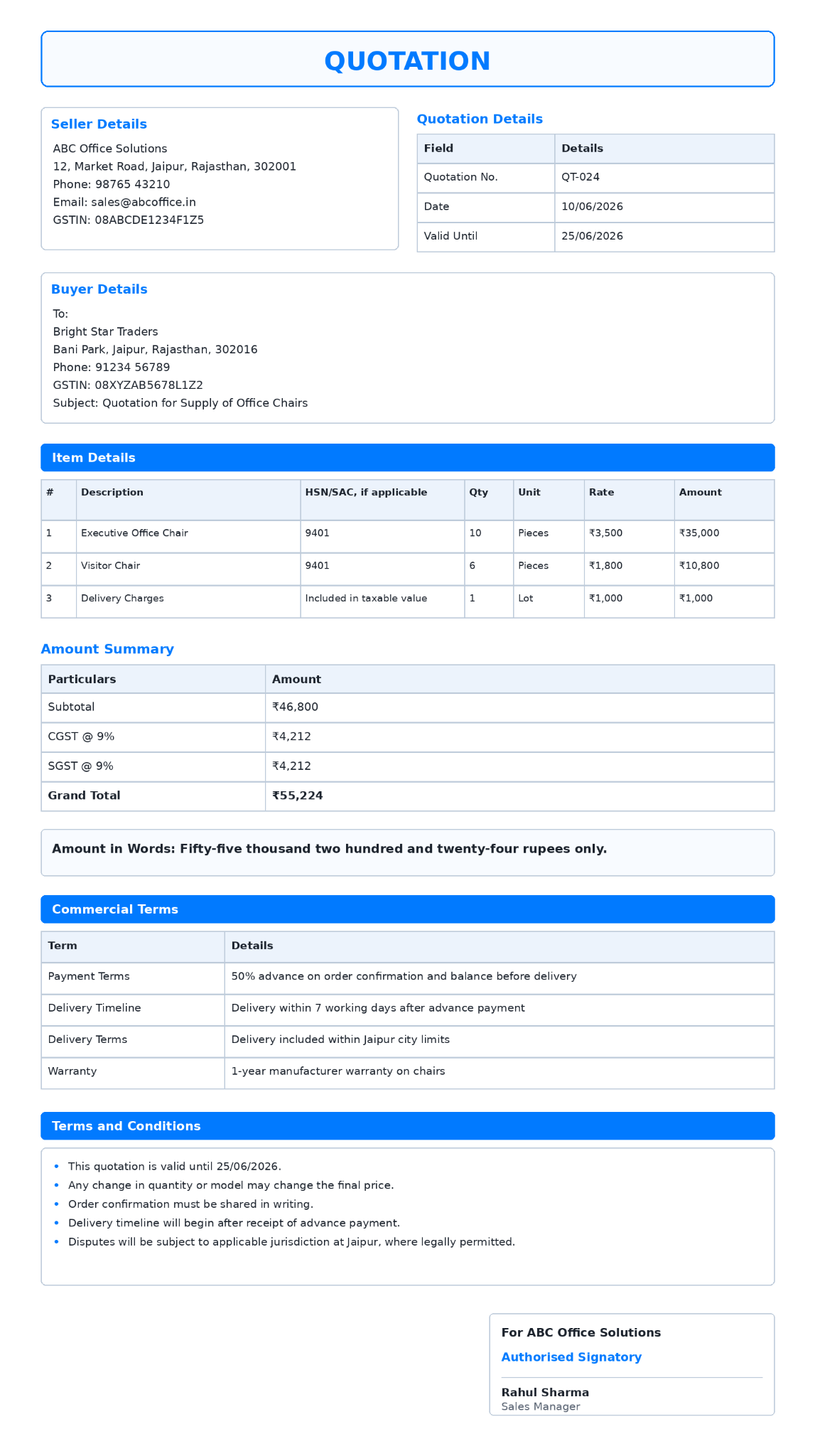
Note: In this example, delivery charges are included in the taxable value because the seller is charging them as part of the supply before delivery. GST treatment may vary depending on the nature of the supply, so businesses should check the final invoice treatment with their accountant. Here’s what each field means:
1. Your Business Details
Add your business name, address, phone number, email, website, if applicable, and GSTIN if you are GST-registered. This helps the buyer identify your business and contact you easily.
2. Quotation Number
Give every quotation a unique number, such as QT-001, QT-002, or MAZU-QT-001. A quotation number helps you track quotes that are pending, accepted, rejected, revised, or expired. It also makes follow-ups easier.
3. Date of Issue
Mention the date on which the quotation is issued. This helps both parties understand when the offer was made.
4. Valid Until
Add the date until which the quoted price is valid. Many small businesses use 15 to 30 days, while industries with fast-changing prices may use a shorter period.
5. Buyer’s Details
Add the buyer’s name, business name, address, phone number, and email. If the buyer is a business and has shared a GSTIN, you can include it as well. This makes the quotation specific to that buyer and avoids confusion later.
6. Subject or Reference
Add a short subject line that explains what the quotation is for. For example, you can write “Quotation for Office Furniture,” “Price Quotation for Website Design Services,” “Quotation for Supply of Packaging Material,” or “Quotation for Repair and Maintenance Work.” This is useful when the buyer is comparing multiple quotations or reviewing the document later.
7. Item or Service Description
This is the main part of the quotation, so clearly mention each product or service. For every item or service, include the item or service name, a short description, quantity, unit of measurement (piece, kg, metre, hour, day, or month), rate per unit, total amount, and HSN or SAC code, if applicable or expected by the buyer.
A quotation is not the same as a GST tax invoice. However, if you are GST-registered, adding the relevant HSN or SAC code can make preparing the final invoice easier later. It is also useful in B2B quotations where the buyer expects GST-ready details.
8. Subtotal, Taxes, and Grand Total
Show the subtotal before tax. Then show GST separately, if applicable. For intra-state supply, this may include CGST and SGST. For inter-state supply, this may include IGST. If you are not GST-registered, clearly mention that GST will not be charged by your business. This helps the buyer compare your quotation fairly with quotes from other suppliers.
9. Payment Terms
Payment terms explain when and how the buyer has to pay. For example, you can mention full advance payment, part advance and part payment before delivery, payment on completion, or payment within 15 or 30 days from the invoice date.
10. Delivery Timeline or Lead Time
Mention when the goods will be delivered or when the service will be completed after order confirmation. For example, you can write “delivery within 7 working days after order confirmation” or “work completion within 15 working days after advance payment.”
11. Delivery Terms
For goods, explain who will arrange delivery and who will pay the delivery cost. You can specify whether delivery is included up to the buyer’s location, freight charges will be billed separately at actual cost, the buyer must arrange pickup from your location, or delivery is available only within city limits.
Some businesses also use trade terms such as Ex Works. If you use such terms, explain them in simple language so the buyer clearly understands what is included in the quoted price and what will be charged separately.
12. Warranty or Guarantee
If the product comes with a warranty, mention the warranty period and what it covers. If there is no warranty, clearly mention that warranty is not applicable. For services, you can mention whether revisions, rework, or support are included.
13. Terms and Conditions
Terms and conditions should cover important points that may affect the order, such as price changes, delivery timelines, scope changes, cancellation charges, and applicable jurisdiction. Keep this section short and simple, especially for small or routine orders.
14. Authorised Signatory
Add the name, designation, and signature of the authorised person. You can also use a digital signature if your business uses one. This makes the quotation look complete and official.
Tips for Writing a Strong Quotation
Be Specific in Item Descriptions
Do not write vague descriptions like “material supply” or “consulting work.” Mention what you are supplying or doing. For example, instead of writing “office chair,” write “Executive office chair with adjustable height and cushioned back.”
Mention What Is Included and What Is Extra
If delivery, installation, packaging, loading, unloading, or support is extra, mention it clearly. This avoids disputes after the buyer accepts the quotation.
Do Not Underquote Just to Win the Order
A very low price may help you win the order, but it can hurt your profit later. Quote based on your actual cost, time, tax, delivery, and margin.
Keep Payment Terms Clear
Do not assume the buyer will pay immediately unless you mention it. Clearly state whether the payment is in advance, partially in advance, on delivery, or after a certain number of days.
Send the Quotation Promptly
A delayed quotation can make the buyer choose another supplier. If you need time to calculate the final price, send an initial estimate and follow up with the final price.
Follow Up Professionally
After sending the quotation, follow up politely. Ask whether the buyer has any questions or wants changes in quantity, scope, or delivery terms.
Common Mistakes to Avoid in a Quotation
1. Not Adding a Validity Date
Without a validity date, the buyer may expect the same price later, even if your costs have changed.
2. Not Mentioning GST Clearly
If you are GST-registered, mention GST separately or clearly state whether prices are inclusive or exclusive of GST. If you are not GST-registered, mention that GST will not be charged by your business.
3. Forgetting Delivery Charges
Many disputes happen because delivery cost is not discussed in advance. Mention whether freight, packing, loading, unloading, or installation charges are included or extra.
4. Not Keeping Written Confirmation
Avoid relying only on phone calls for confirmed orders, especially for high-value or customised work.
5. Using the Same Number Series for Quotations and Invoices
It is better to keep quotation numbers and invoice numbers separate. For example, use QT-001 for quotations and INV-001 for invoices.
Once your quotation format is clear, it is also useful to maintain consistency in the process. If you do not want to create quotations manually, mazu lets you create professional quotations and invoices easily from one screen.
Conclusion
A well-made quotation helps the buyer understand your offer, price, payment terms, delivery timeline, and responsibilities before the order is confirmed.
For a small business owner, using a clear quotation format can reduce confusion around pricing, GST, delivery charges, and order approval. Use the template and example above as a starting point, customise it for your business, and keep every important term clear before the buyer confirms the order.