Purchase Order Meaning, Format, and Use in Small Business
Many small business owners place orders through phone calls, WhatsApp messages, or quick verbal confirmations. This may work in the early days, especially when order volumes are low. But as orders increase, it becomes difficult to remember what was ordered, at what price, when it was expected, and whether the full quantity was received.
Written by
Reviewed by
Quick summary
- A purchase order, or PO, is a document a buyer sends to a supplier before goods or services are delivered.
- It records what you are ordering, the quantity, the price, the delivery date, and the payment terms.
- Purchase orders help small businesses track what has been ordered, what has been received, and what is still pending.
- A PO is different from an invoice. You send a PO to order goods. The supplier sends an invoice to request payment.
- If you do not track purchase orders, you may face stock mismatch, overbilling, duplicate orders, and unclear supplier records.
This is where a purchase order helps. It puts the order in writing before goods are supplied, so the buyer and supplier can refer to the same details later.
This guide explains how purchase orders work, what a simple PO format should include, and how small businesses can use POs to track supplier orders more clearly.
What Is a Purchase Order?
A purchase order, commonly called a PO, is a document that a buyer sends to a supplier to request goods or services. It clearly mentions what is being ordered, the quantity, the agreed price, the delivery date, and the payment terms. In simple words, a purchase order is your written order to the supplier.
For example, instead of only calling a supplier and saying, “Send 100 boxes of packaging material,” you create a PO with the item name, quantity, rate, delivery date, delivery address, payment terms, and PO number. Once the supplier accepts the PO, both sides have a clear reference. This makes the order easier to confirm and track.
Why Purchase Orders Matter for Inventory Tracking
For a small business, a PO is not just a purchase document. It helps you track goods before they enter your stock. This is important because many stock problems start before the goods even arrive.
Without proper PO tracking, you may reorder items already on the way, miss pending supplier deliveries, or pay invoices without checking the quantity received. This can lead to stock mismatches, overpayments, and delayed customer orders.
A purchase order helps you avoid these problems by creating a clear trail from order placement to stock receipt. When goods arrive, you can compare the received quantity with the PO. For example, if you ordered 100 units but received only 80, you can record the shortage immediately and follow up with the supplier.
PO tracking also helps you avoid placing orders without checking what is already pending. Before placing a new order, you can check whether the same item is already expected from a supplier.
When Should a Small Business Use Purchase Orders?
You may not need a PO for every small purchase. For example, buying tea, pens, or a few stationery items may not require a formal PO. But purchase orders are useful in the following cases.
High-value or advance payment orders
If the order value is high or you are paying before receiving goods, a PO gives you a written record of the agreed quantity, price, delivery date, and payment terms.
Regular supplier orders
If you buy from the same supplier repeatedly, POs help you maintain an accurate order history.
Stock or raw material purchases
If the purchase affects your inventory, production, or customer orders, it should be tracked through a PO.
Custom or made-to-order goods
If goods are being made specifically for your business, a PO helps avoid mistakes in size, grade, design, material, or quantity.
Large quantity orders
When many items or large quantities are involved, a PO reduces the risk of missed or incorrect items or delivery confusion.
Orders handled by more than one person
If one person places the order, another person receives the goods, and someone else makes the payment, a PO keeps everyone aligned.
Purchase Order vs Invoice: Understanding the Difference
A purchase order and an invoice are connected, but they are not the same document.
| Point | Purchase Order | Invoice |
|---|---|---|
| Sent by | Buyer | Supplier |
| When it is sent | Before goods are delivered | After goods are delivered or services are completed |
| Purpose | To place or approve an order | To request payment |
| Main use | Purchase tracking | Payment and accounting |
| Payment status | Payment is not due just because a PO is created | Payment is due as per invoice terms |
| Example | You send a PO for 100 units | Supplier sends an invoice after supplying 100 units |
Point
Purchase Order
Invoice
Point
Purchase Order
Invoice
Point
Purchase Order
Invoice
Point
Purchase Order
Invoice
Point
Purchase Order
Invoice
Point
Purchase Order
Invoice
Once this difference is clear, the next step is understanding how a purchase order moves from creation to payment.
The Purchase Order Process: Step by Step
Here is how the purchase order process usually works for a small business.
Step 1: Identify What You Need
Start by checking what you need to buy. This may include stock, raw material, packaging, office supplies, or equipment. If the supplier has already shared a quotation, you can use it when preparing the PO.
Step 2: Create the Purchase Order
Create a PO with the main order details, including buyer and supplier details, item details, quantity, rate, delivery date, payment terms, and GST details, where applicable. Give each PO a unique number so you can find it quickly while checking delivery, invoice, or payment status.
Step 3: Send the PO to the Supplier
You can send the PO through email, WhatsApp, or a billing and inventory tool. The main point is to send a clear written order that both sides can refer to later.
Step 4: Supplier Confirms the PO
The supplier checks the PO and confirms whether they can fulfil the order. This confirmation may come through email, message, signed copy, or by supplying the goods as agreed. If the supplier cannot deliver the same quantity, price, or timeline, they should inform you before dispatch.
Step 5: Goods Are Dispatched
Once the order is confirmed, the supplier dispatches the goods or starts the work. They may also send a delivery challan or delivery note with the shipment.
Step 6: Record What You Receive
When the goods arrive, record the actual quantity and condition of the items received. If there is any shortage, damage, or difference in item specifications, note it immediately. Some businesses use a Goods Received Note, or GRN, for this. A GRN is a simple record of what was actually received.
Step 7: Supplier Sends the Invoice
After delivery, the supplier sends an invoice. The invoice should ideally include the PO number so both documents can be easily matched.
Step 8: Match and Pay
Before making payment, compare the PO, delivery record, and supplier invoice. The PO shows what you ordered, the delivery record shows what you received, and the supplier invoice shows what is being billed. If the details match, you can process the payment. If there is a difference in item, quantity, rate, or amount, raise it with the supplier before paying.
Purchase Order Format and Example: Fields Explained
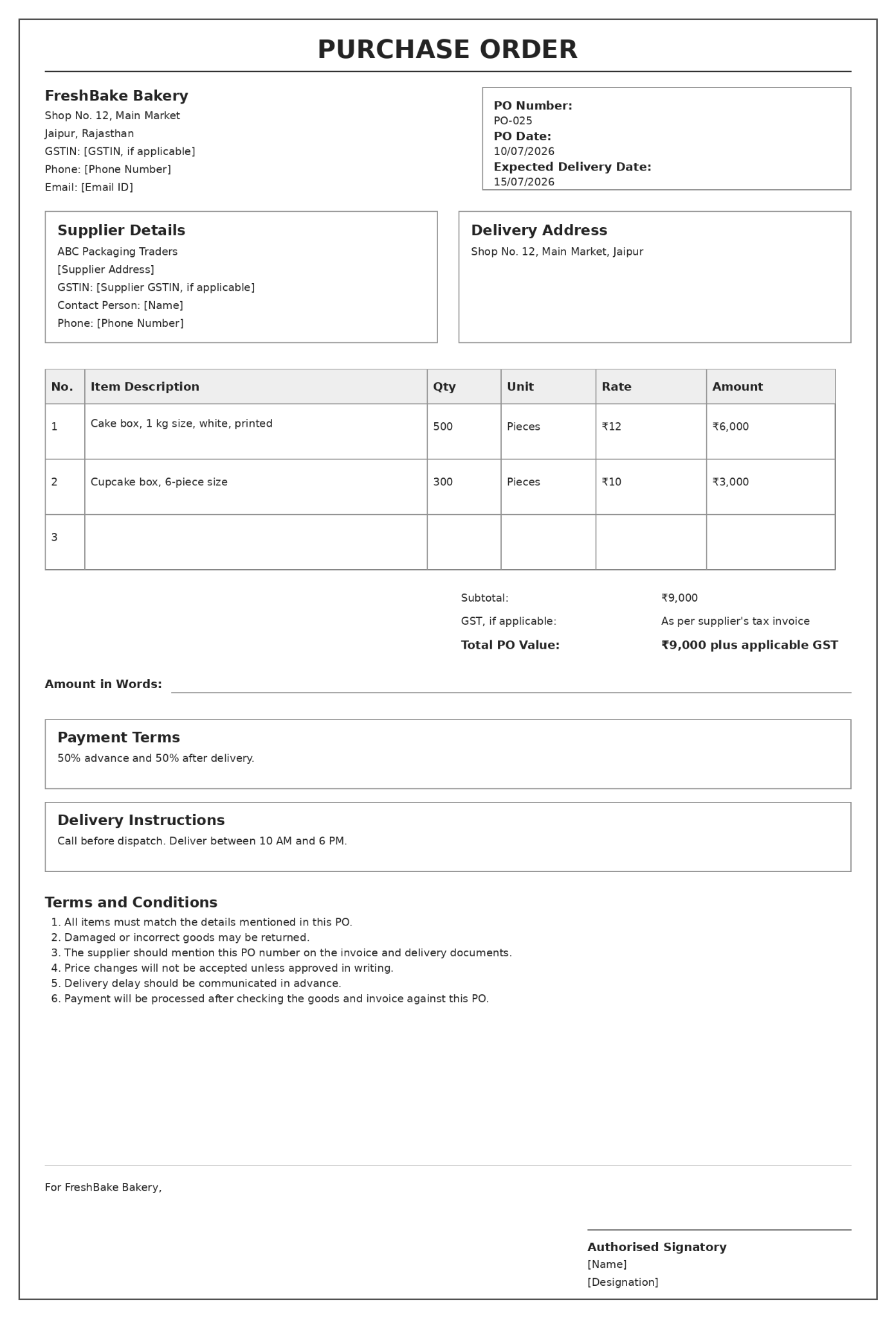
A purchase order format does not need to be complicated. The example above shows the main fields a bakery uses to record an order clearly. Here is what each field means.
1. Buyer Details
Buyer details include your business name, address, phone number, email ID, and GSTIN if applicable. This helps the supplier clearly identify who is placing the order.
2. Supplier Details
Supplier details include the supplier’s business name, address, contact person, phone number, and GSTIN if applicable. This keeps the supplier record clear and helps avoid confusion during delivery, billing, or payment follow-up.
3. PO Number
Each purchase order should have a unique PO number, such as PO-001, PO-002, or PO-2026-001. This number helps you track the order when checking delivery status, supplier invoice, or payment details.
4. PO Date
The PO date is the date on which the purchase order is created. It helps both the buyer and supplier track the order timeline.
5. Expected Delivery Date
The expected delivery date indicates when the goods should be delivered. This is useful when you need stock by a specific date for customer orders, production, or store replenishment.
6. Delivery Address
The delivery address should mention the exact location where the goods need to be delivered. This may be your shop, office, warehouse, factory, or project site. If the delivery address is different from your business address, mention it clearly.
7. Item Details
Item details are the most important part of the purchase order. This section should clearly mention the item name, specification, HSN code where applicable, quantity, unit, rate, and amount. Avoid vague item names. For example, instead of writing “boxes,” write “corrugated packaging box, 12 x 8 x 6 inches, 5-ply.”
8. GST and Total Amount
This section includes the subtotal, GST where applicable, and final order value. It helps the supplier understand the full order amount and helps you plan your purchase cost before the invoice is raised.
9. Payment Terms
Payment terms explain when and how the supplier will be paid. For example, payment may be due within 30 days after delivery, 50% may be paid in advance and 50% after delivery, or payment may be released only after invoice approval.
10. Delivery Instructions
Delivery instructions help the supplier deliver the goods correctly. You can mention details such as working-hour delivery, call before dispatch, warehouse gate number, or special packing instructions for fragile items.
11. Terms and Conditions
Terms and conditions should be simple and practical. They can mention that goods must match the PO, that damaged or incorrect goods may be returned, that price changes require written approval, that the invoice should mention the PO number, and that delivery delays should be communicated in advance.
12. Authorised Signatory
The authorised signatory is the person who approves the purchase order on behalf of the business. This helps maintain accountability if a dispute, approval query, or payment issue arises later.
This example shows how a bakery can use a purchase order to record what was ordered, when it should arrive, and what amount should be checked against the supplier invoice.
Once your PO is created, it is also important to keep purchase bills, invoices, and payments organised. mazu helps small businesses manage billing records in one place, so supplier transactions are easier to track and follow up.
Common Purchase Order Mistakes to Avoid
Even a simple PO can create confusion if important details are missing. Avoid these common mistakes.
Placing orders without a written PO
Phone calls and WhatsApp chats are useful for communication, but they are easy to lose or misread. For important purchases, create a proper PO so both parties have a single, clear record.
Using unclear item descriptions
Avoid vague names like “boxes” or “material.” Mention key specifications so the supplier knows exactly what to send.
Missing PO number or delivery date
A PO number helps you match the order with the supplier invoice and delivery record. A delivery date helps you follow up if the goods do not arrive on time.
Paying before checking the order
Do not pay only because an invoice has arrived. First, check whether the invoice matches the PO and the actual quantity received.
Mixing PO and invoice numbers
Keep PO numbers and invoice numbers separate. This keeps records easier to search and track.
How to Track Purchase Orders in a Small Business
Creating a PO is only the first step. You also need to track it until the order is completed. This helps you know whether the supplier has confirmed the order, delivered the goods, sent the invoice, and payment has been completed.
Step 1: Maintain a PO register
Keep all purchase orders in one place. This can be a notebook, a spreadsheet, a billing app, or an inventory tool. The register should help you quickly check the PO number, supplier name, order date, item ordered, order value, expected delivery date, order status, and payment status.
Step 2: Use a clear order status
Every PO should have a simple status so you know where it stands. For example, a PO may be created, sent to the supplier, confirmed, partially received, fully received, invoiced, paid, closed, or cancelled. This avoids confusion when multiple supplier orders are open simultaneously.
Step 3: Record partial deliveries
Sometimes suppliers deliver only part of the order. For example, if you ordered 100 units but received only 60, mark the PO as partially received and keep the remaining 40 units pending. This helps you follow up with the supplier without losing track of the balance quantity.
Step 4: Check the invoice before payment
Mark the invoice status clearly, such as received, checked, pending correction, or ready for payment. This helps you avoid paying invoices that are still under review.
Step 5: Close the PO after completion
A PO should be closed only after the goods are received, the invoice is checked, and the payment status is clear. This keeps your purchase records clean and helps you separate open orders from completed ones.
Simple PO Tracking Table
A simple PO tracking table can look like this:
| PO No. | Date | Supplier | Item | PO Value | Delivery Date | Received Qty | Pending Qty | Invoice Received | Payment Status | PO Status |
|---|---|---|---|---|---|---|---|---|---|---|
| PO-001 | 05/07/2026 | ABC Traders | Packaging boxes | ₹10,000 | 10/07/2026 | 500 | 0 | Yes | Paid | Closed |
| PO-002 | 06/07/2026 | XYZ Suppliers | Raw material | ₹25,000 | 12/07/2026 | 60 | 40 | No | Pending | Partially received |
PO No.
Date
Supplier
Item
PO Value
Delivery Date
Received Qty
Pending Qty
Invoice Received
Payment Status
PO Status
PO No.
Date
Supplier
Item
PO Value
Delivery Date
Received Qty
Pending Qty
Invoice Received
Payment Status
PO Status
Conclusion
A purchase order helps small businesses keep supplier orders clear from the start. For a newly started business, PO tracking may feel like extra work. But it saves time and confusion later, especially when order volume grows. It also helps you plan inventory better because you can see open orders before placing new ones.
Start with a simple purchase order format. Use a unique PO number for every order. Track each PO until goods are received and payment is completed. This small habit can make your purchase, inventory, and supplier records much cleaner.