GST Registration for Small Businesses: Eligibility, Documents, and Process
One of the first tax questions for a new business owner is simple: do I need GST registration?
The answer depends on your turnover, type of business, state, customers and selling method. Some small businesses can start without registration, while others must register even when their turnover is low.
Written by
Reviewed by
Quick summary
- GST registration is required when your business crosses the applicable turnover limit.
- For many businesses, the limit is ₹40 lakh for goods and ₹20 lakh for services.
- Some businesses must register even if their turnover is below the limit.
- Not every small business needs to be registered from day one.
- Voluntary registration can help if you want to claim input tax credit or work with GST-registered customers.
- Common documents required for registration include PAN, Aadhaar, business address proof, photographs and authorisation documents, where applicable.
- After GST registration, you must issue proper invoices, maintain records, add bank details on time and file GST returns regularly.
It is important to know when GST registration becomes required. Registering too early can add extra compliance work. Delaying it when registration is already required can lead to tax notices, penalties, and issues with customers, vendors, or online platforms.
This guide explains GST registration for small businesses, including eligibility, turnover limits, documents, the online process, and post-registration responsibilities.
What Is GST Registration?
GST registration is the process of registering your business under the Goods and Services Tax system in India. Once your application is approved, your business gets a GSTIN. GSTIN stands for Goods and Services Tax Identification Number. It is a 15-character number linked to your PAN.
After registration, your business can collect GST from customers, claim input tax credit on eligible purchases, issue GST-compliant invoices, file GST returns, and sell to GST-registered businesses more easily. Without GST registration, you cannot charge GST on your invoices. You also cannot claim input tax credit for GST paid on business purchases.
Who Needs GST Registration?
GST registration depends on two main factors: your annual turnover and the type of business activity you carry out. Some businesses need to register only after crossing the turnover limit. Others must register even if their turnover is below the limit.
To understand whether GST registration applies to your business, check these three areas.
1. Businesses That Cross the Turnover Limit
The most common reason for GST registration is crossing the annual aggregate turnover limit. For GST registration, turnover means aggregate turnover. It is calculated across India under the same PAN. It is not calculated separately for each shop, branch or state.
Aggregate turnover generally includes taxable supplies, exempt supplies, export supplies and inter-state supplies. It excludes GST, compensation cess and inward supplies on which tax is payable under reverse charge. For example, if you have one shop in Delhi and another in Haryana under the same PAN, the turnover of both shops is counted together. The general turnover limits are:
| Type of Business | General Limit | Lower Limit in Specified States |
|---|---|---|
| Businesses supplying only goods | ₹40 lakh | ₹20 lakh |
| Businesses supplying services | ₹20 lakh | ₹10 lakh |
| Businesses supplying both goods and services | ₹20 lakh | ₹10 lakh |
Type of Business
General Limit
Lower Limit in Specified States
Type of Business
General Limit
Lower Limit in Specified States
Type of Business
General Limit
Lower Limit in Specified States
For goods-only businesses, the ₹20 lakh limit applies in states and union territories such as Arunachal Pradesh, Manipur, Meghalaya, Mizoram, Nagaland, Puducherry, Sikkim, Telangana, Tripura and Uttarakhand. For services or mixed supplies, the ₹10 lakh limit applies in Manipur, Mizoram, Nagaland and Tripura.
2. Businesses That Must Register Even Below the Turnover Limit
Some businesses must register even if their turnover is below the normal limit. This usually depends on the nature of the supply, the selling channel, or the tax responsibility.
Inter-State Taxable Supply
A person making inter-state taxable supply is generally required to register under GST, subject to specific exemptions. For example, if a business in Delhi sells goods to customers in Uttar Pradesh, it is generally an inter-state supply.
For services, small service providers may still get the turnover threshold benefit in many cases. So a freelancer or consultant below the service threshold may not need GST registration only because the client is in another state, unless another compulsory registration rule applies.
Sellers on E-Commerce Platforms
If you sell goods through platforms such as Amazon, Flipkart, Meesho, or similar marketplaces, GST registration is usually required.
However, there is a limited exemption for certain small goods sellers who sell only within their state through an e-commerce operator and meet the required conditions. These conditions may include PAN-based enrolment and no inter-state supply.
Marketplace rules may also be stricter than GST law. So sellers should check both GST rules and the platform’s seller requirements before starting.
Casual Taxable Persons
A casual taxable person is someone who occasionally supplies goods or services in a state where they do not have a fixed place of business. For example, if you run a business in Jaipur and set up a temporary stall at an exhibition in Mumbai, you may need temporary GST registration as a casual taxable person. A casual taxable person should apply at least five days before starting the business activity.
Persons Liable Under Reverse Charge
In some cases, the buyer has to pay GST directly to the government rather than the supplier charging it. This is called reverse charge. If your business is required to pay GST under reverse charge, GST registration may become compulsory.
In some cases, a supplier whose entire supply is subject to reverse charge in the recipient's hands may not need registration. This depends on the nature of supply and the applicable notification, so it should be checked carefully.
TDS Deductors, E-Commerce Operators and Input Service Distributors
GST registration is also compulsory for certain specific categories, such as persons required to deduct TDS under GST, e-commerce operators required to collect TCS, input service distributors, non-resident taxable persons, agents supplying goods or services on behalf of other taxable persons, and persons notified under GST law. These categories are specific and may not apply to every small business.
3. Businesses That May Not Need GST Registration
Not every small business needs GST registration from day one. You may not be required to be registered if your turnover is below the applicable limit, your supplies are within your state, you are not covered under any compulsory registration category, you are not required to pay GST under reverse charge, and you do not sell through an e-commerce model where registration is required.
Some persons are also not liable to register under GST, such as persons dealing only in wholly exempt or non-taxable goods or services and agriculturists supplying produce from cultivation of land. For example, a local service provider with turnover below the GST threshold may not need to be GST registered immediately, provided no compulsory registration rule applies.
GST Registration Examples for Small Businesses
Here are a few simple examples to understand when GST registration may or may not be required.
| Business Example | Situation | Is GST Registration Required? |
|---|---|---|
| Local retail shop | A shop sells only within the same state and has turnover of ₹18 lakh. | May not be required if no compulsory registration rule applies. |
| Goods seller crossing the turnover limit | A trader supplying goods crosses ₹40 lakh turnover in a general state. | Required once the applicable threshold is crossed. |
| Freelancer below the service limit | A freelancer who provides service earns ₹12 lakh per year. | May not be required if no compulsory registration rule applies. |
| Seller on an e-commerce marketplace | A small seller wants to sell goods through Amazon, Flipkart, Meesho or a similar platform. | Generally required. However, a limited exemption may apply to certain below-threshold sellers who make only intra-state supply through an e-commerce operator and complete the required PAN-based enrolment. Platform rules should also be checked. |
| Business with branches in two states | A business has regular operations or a place of business in two different states. | Separate GST registration may be required for each state where the business has a place of business. |
Business Example
Situation
Is GST Registration Required?
Business Example
Situation
Is GST Registration Required?
Business Example
Situation
Is GST Registration Required?
Business Example
Situation
Is GST Registration Required?
Business Example
Situation
Is GST Registration Required?
These examples are only for basic understanding. The actual requirement may vary depending on the state, type of supply, sales channel, interstate activity, and whether any compulsory registration rule applies.
When Should You Apply for GST Registration?
If GST registration becomes mandatory for your business, you should apply within 30 days from the date you become liable. For casual taxable persons and non-resident taxable persons, the application should be made at least five days before starting business activity.
Do not wait until the end of the financial year if your turnover has already crossed the limit. Once the liability arises, the registration timeline starts.
Voluntary GST Registration
Even if GST registration is not compulsory for your business, you can still choose to register voluntarily. This may be useful when registration gives your business a practical advantage.
For example, voluntary registration can help if you want to claim input tax credit on eligible purchases, sell to GST-registered businesses, issue GST invoices to customers, or expand beyond your local market. It can also make your business look more formal when dealing with larger clients.
A small manufacturer, for instance, may be below the turnover limit but may still choose to register if it buys taxable raw materials and sells mainly to GST-registered buyers. In such a case, registration can help the business claim input tax credit and work more smoothly with B2B customers.
However, voluntary registration also comes with regular compliance. Once registered, you must file GST returns, maintain records, and follow GST rules, even if your sales are low or there is no business activity in a particular period. So, voluntary GST registration should be taken as a business decision, not just as a formality.
Composition Scheme for Small Businesses
The Composition Scheme is a simpler GST option for eligible small businesses. It is mainly useful for small traders, manufacturers, restaurants, and certain service providers who want simpler compliance. Under this scheme, eligible businesses pay GST at a fixed rate and follow simpler payment and return requirements.
The scheme is generally available up to ₹1.5 crore turnover in the previous financial year. For specified special category states, the limit is ₹75 lakh. Certain service providers have a separate composition option with a ₹50 lakh limit. The applicable Composition Scheme rates are given below:
| Business Type | Effective Total GST Rate |
|---|---|
| Manufacturers | 1% |
| Traders and other eligible suppliers | 1% |
| Restaurants not serving alcohol | 5% |
| Certain service providers | 6% |
Business Type
Effective Total GST Rate
Business Type
Effective Total GST Rate
Business Type
Effective Total GST Rate
Business Type
Effective Total GST Rate
Note: These are broad effective rates for easy understanding. The actual applicability depends on your business type and GST rules.
What You Cannot Do Under the Composition Scheme
A business under the Composition Scheme is subject to certain restrictions. It generally cannot claim input tax credit, collect GST separately from customers, make inter-state outward supplies, sell through e-commerce operators where TCS applies, or issue regular tax invoices.
Instead of a tax invoice, a composition dealer issues a bill of supply. This means the dealer pays GST at the applicable composition rate but does not show GST separately on the invoice given to the customer.
Who Should Consider the Composition Scheme?
The Composition Scheme may suit small retail shops, local traders, small restaurants and small manufacturers that mainly sell within one state. It can also work for businesses with lower input tax credit needs and seeking simpler GST compliance.
However, it may not be suitable for businesses that buy many taxable inputs and want to claim input tax credit. In such cases, regular GST registration may be a better option because it allows eligible input tax credit claims.
GST Registration Documents Required
GST registration documents depend on your business structure. Some documents are common for most applicants, while others are required only for partnership firms, LLPs or companies.
Common Documents Required for GST Registration
| Document | Why It Is Needed |
|---|---|
| PAN | GSTIN is linked to PAN |
| Aadhaar | Used for identity verification and authentication |
| Photograph | Required for proprietor, partners, directors or authorised signatory |
| Business address proof | Used to verify the principal place of business |
| Mobile number and email ID | Used for OTP verification and GST portal communication |
| Bank account details | Usually added after registration, within the required time |
| Authorisation document | Required when someone is signing the application on behalf of the business |
Document
Why It Is Needed
Document
Why It Is Needed
Document
Why It Is Needed
Document
Why It Is Needed
Document
Why It Is Needed
Document
Why It Is Needed
Document
Why It Is Needed
Documents Based on Business Type
| Business Type | Additional Documents Usually Required |
|---|---|
| Sole proprietor | PAN and Aadhaar of the proprietor, photograph of the proprietor, and business address proof |
| Partnership firm | PAN of the firm, partnership deed, PAN and Aadhaar of partners, photographs of partners, and authorization letter for the authorized signatory |
| LLP | PAN of the LLP, certificate of incorporation, LLP agreement, PAN and Aadhaar of designated partners, photographs of designated partners and authorization letter or resolution |
| Private limited company | PAN of the company, certificate of incorporation, Memorandum of Association, Articles of Association, PAN and Aadhaar of directors, photographs of directors, board resolution and Digital Signature Certificate, where applicable |
Business Type
Additional Documents Usually Required
Business Type
Additional Documents Usually Required
Business Type
Additional Documents Usually Required
Business Type
Additional Documents Usually Required
For a sole proprietorship, the proprietor's PAN is used because the business does not have a separate legal PAN. For firms, LLPs, and companies, the business entity's PAN is required. For most taxpayers, bank account details must be added on the GST portal within 30 days of registration, or before filing GSTR-1 or using the Invoice Furnishing Facility, whichever is earlier.
Address Proof for GST Registration
Address proof is required to verify the principal place of business. This is the main location from which your business operates. The documents needed depend on whether the place is owned, rented, or used with permission.
| Type of Business Place | Documents Usually Required |
|---|---|
| Owned property | Electricity bill, property tax receipt, municipal khata copy or ownership document |
| Rented property | Rent agreement, No Objection Certificate from the owner, owner’s address proof, and electricity bill or property tax receipt |
| Shared property or property used with permission | Consent letter or NOC from the owner, owner’s address proof, and utility bill or ownership proof |
Type of Business Place
Documents Usually Required
Type of Business Place
Documents Usually Required
Type of Business Place
Documents Usually Required
If you have more than one business location, you may need to add those locations as additional places of business in the GST application. Address proof may be required for each added location.
How to Register for GST Online: Step-by-Step Process
The entire GST registration process is carried out on the GST portal (gst.gov.in). Below is a complete walkthrough divided into two parts.
Part A: Generate Your Temporary Reference Number (TRN)
Step 1: Open the New Registration Page
Go to the official GST portal. From the top menu, click on Services, then select Registration, and click on New Registration. This will open the registration form.

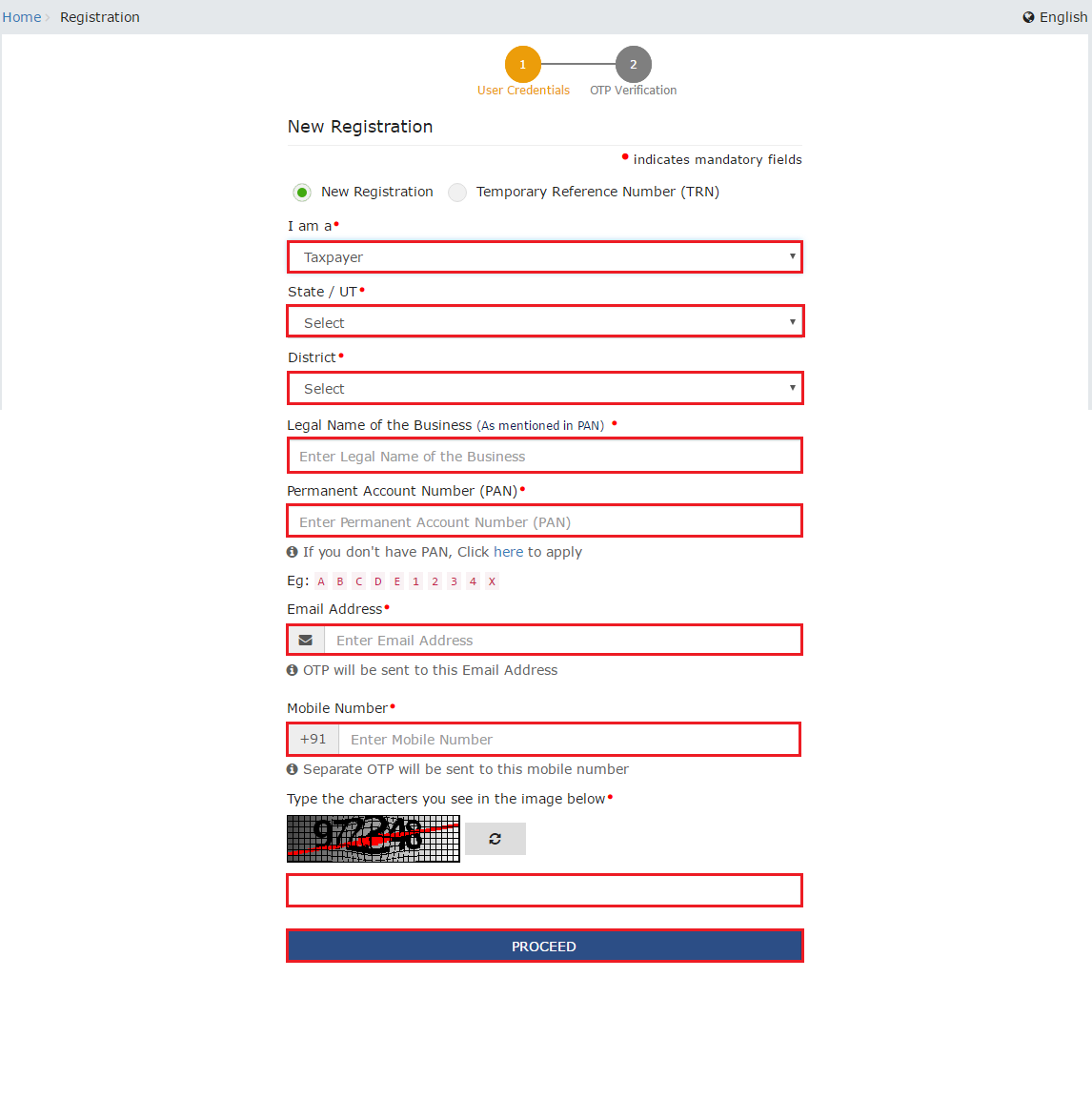
Step 2: Enter Your Basic Business Details
On the New Registration page, select New Registration under "I am a". Then choose Taxpayer as your type. Select your state and district, enter the legal name of your business as it appears on your PAN, and enter your PAN number. Also provide your email address and mobile number. Both of these must be active, as OTPs will be sent to them.
Step 3: Verify Your Email and Mobile Number
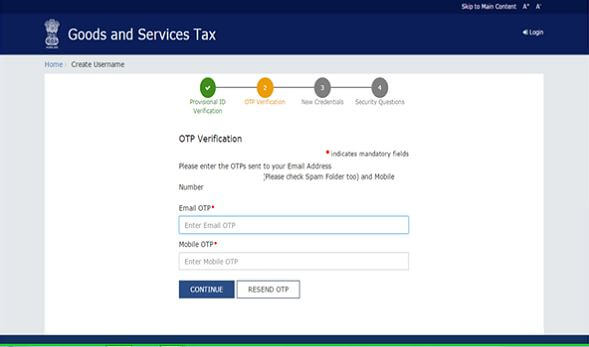
You will receive two separate OTPs: one on your registered email and one on your mobile number. Enter both OTPs in the respective fields to complete verification. Each OTP is valid for a limited time, so enter them promptly.
Check About - Free GST invoice Generator online with mazu
Step 4: Get Your Temporary Reference Number (TRN)
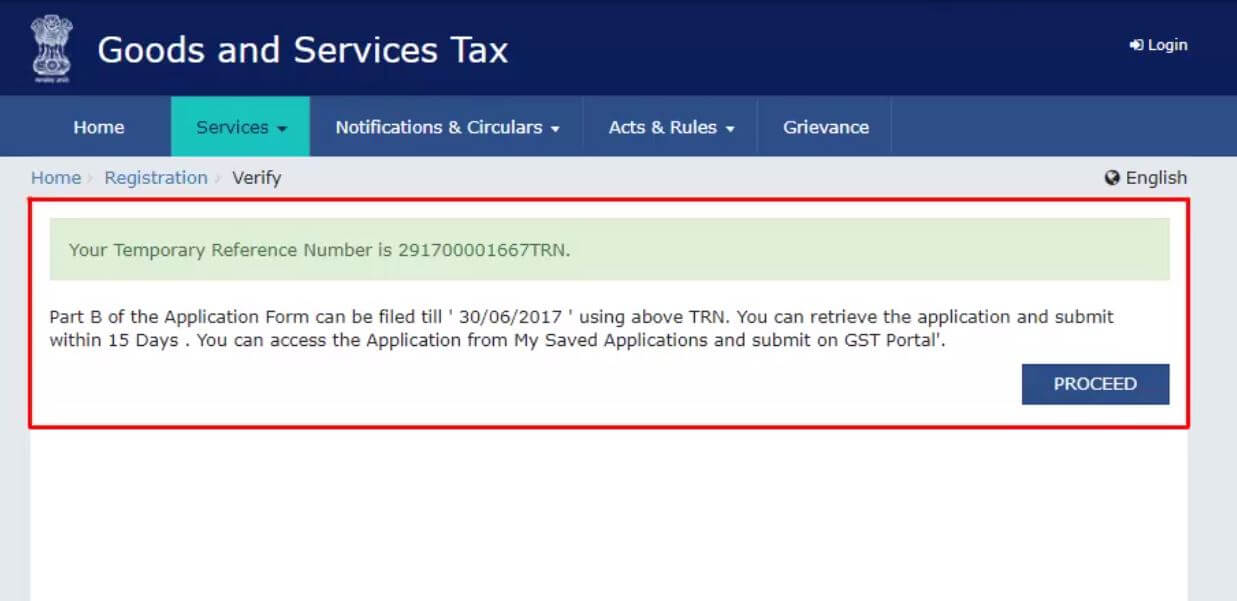
After successful OTP verification, a 15-digit Temporary Reference Number (TRN) is generated and displayed on the screen. It is also sent to your email and mobile. Make a note of this number, you will need it to access and complete Part B of the application. Part B must be completed within 15 days of TRN generation.
Step 5: Log In Using the TRN
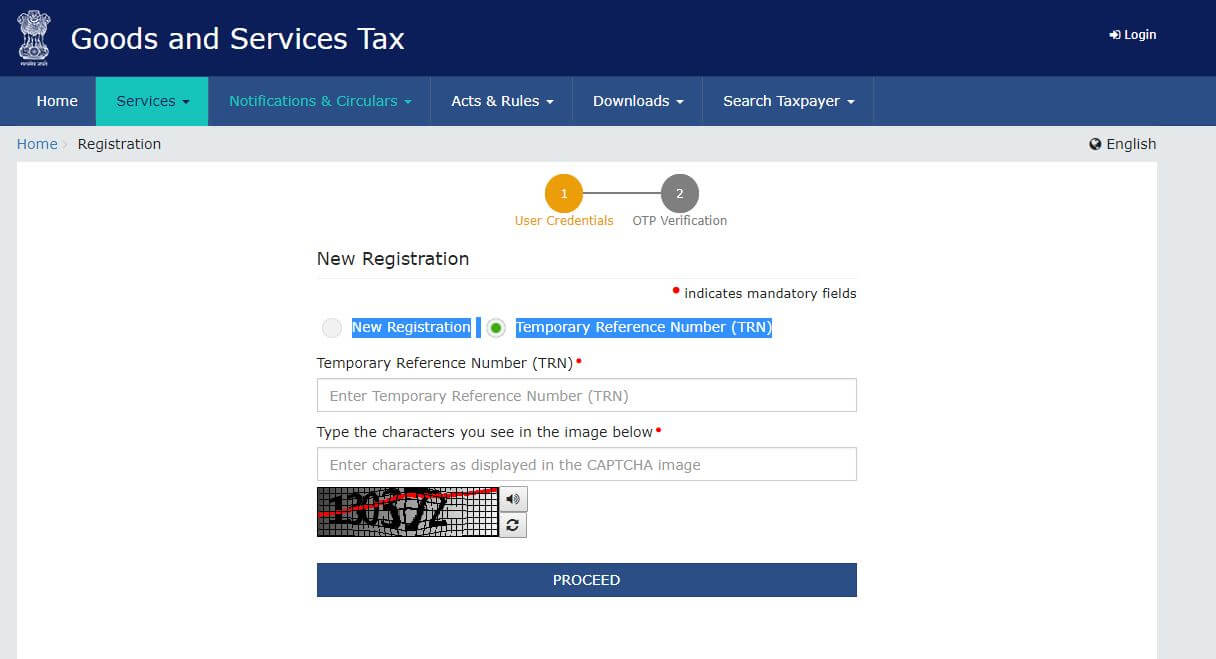
Go back to the New Registration page. This time, select Temporary Reference Number (TRN) and enter the TRN you received. Enter the captcha and click Proceed.
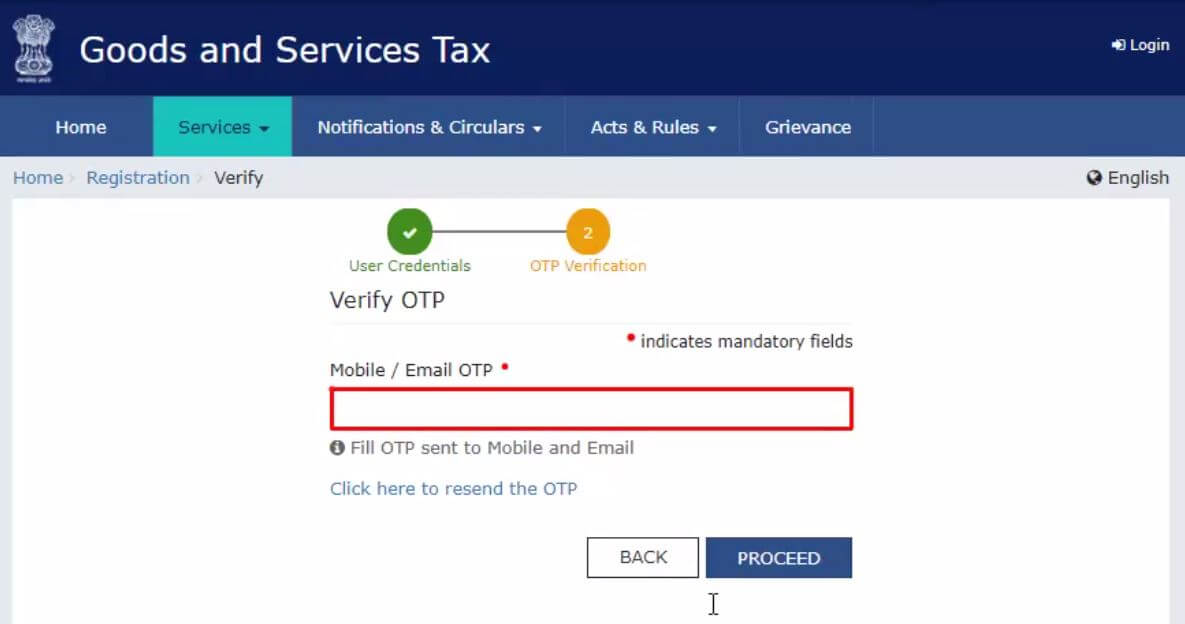
Step 6: Enter the OTP Sent to Your Email and Mobile
A new OTP will be sent to your email and mobile to authenticate your TRN login. Enter the OTP and proceed to access Part B of your application.
Step 7: Open the Saved Application
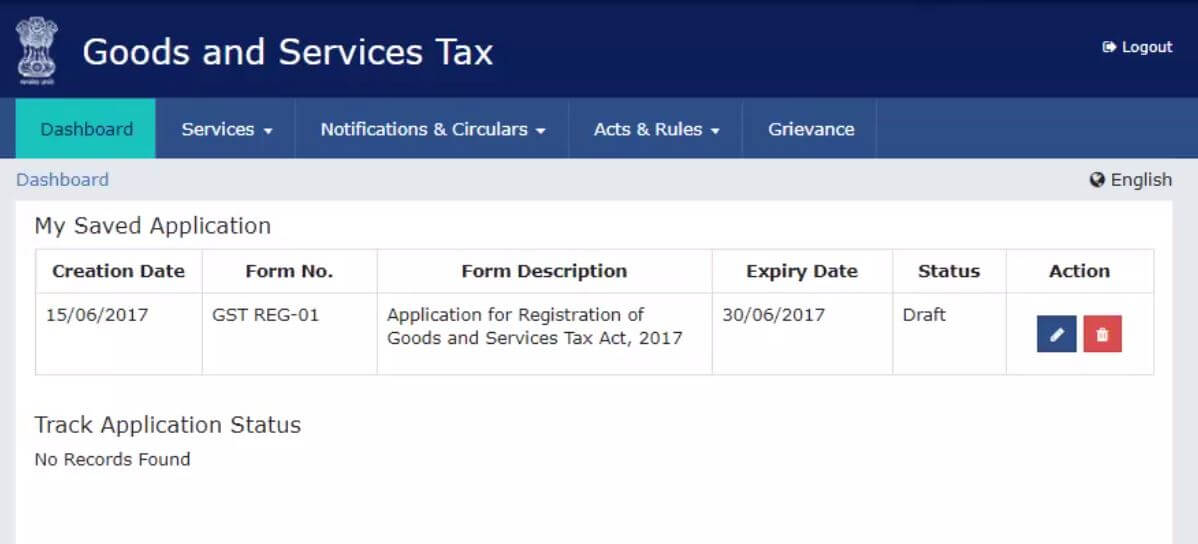
After logging in, you will see your application listed under My Saved Applications, with the status shown as Draft. Click the Edit icon (pencil icon) to open and fill in Part B of the form.
Part B: Complete the Registration Application
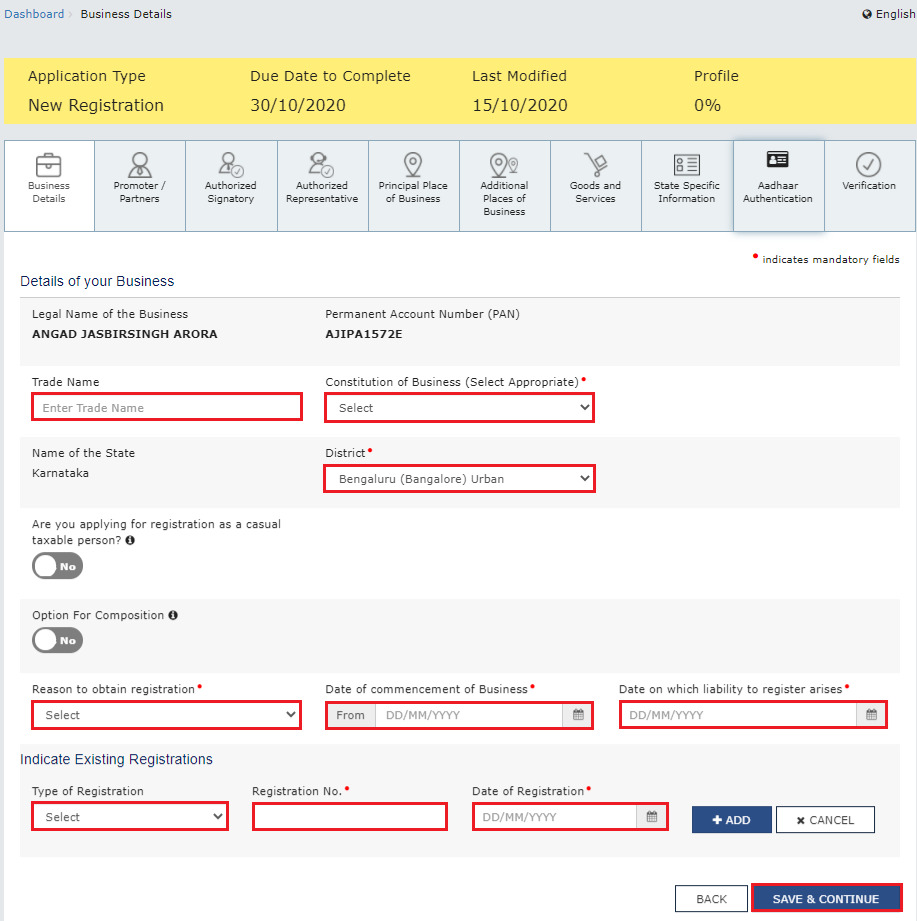
Step 8: Fill in Business Information
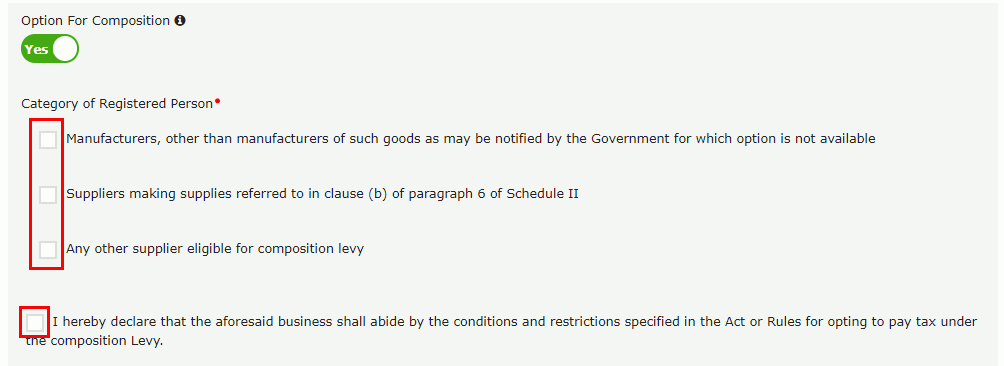
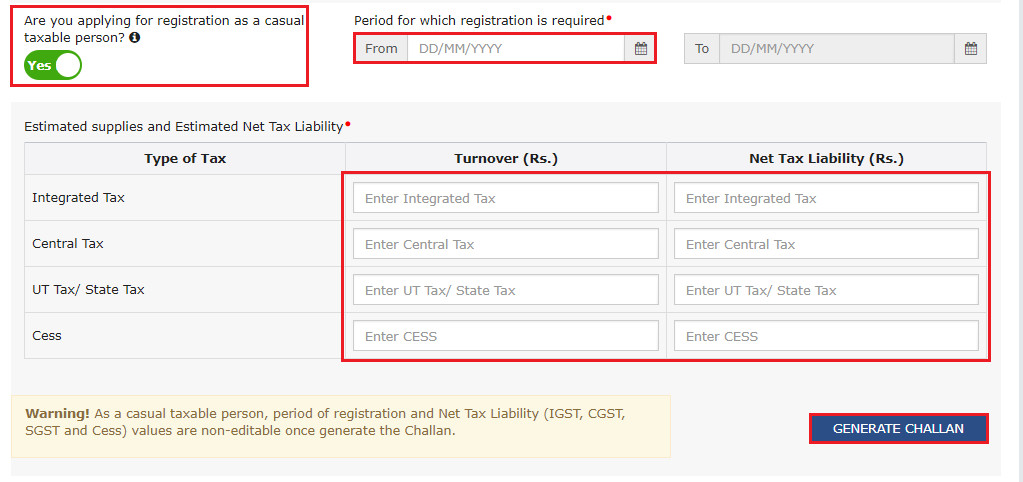
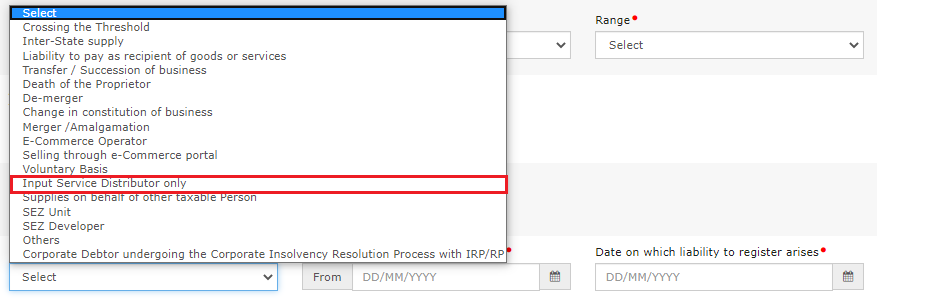
This is the first tab of Part B. Enter the trade name of your business (if different from legal name), constitution of business (proprietorship, partnership, private limited, etc.), and whether you want to opt for the composition scheme. Also mention the date of commencement of business, whether you are a casual taxable person, and the reason for obtaining registration. If you already hold any other tax registrations, report them here.
Step 9: Add Promoter or Partner Details
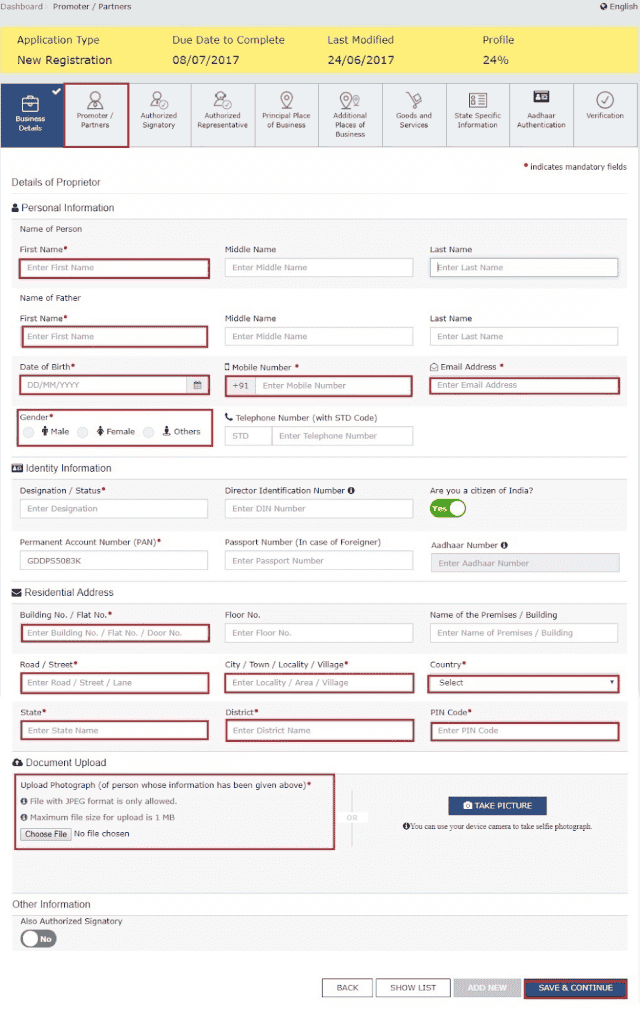
In the Promoters/Partners tab, enter the personal and identity details of all promoters, partners, or directors. You can add up to 10 promoters. For each person, upload a photograph (JPEG or PDF, under 1 MB). You must also designate one person as the primary authorized signatory.
Step 10: Enter Authorized Signatory Details
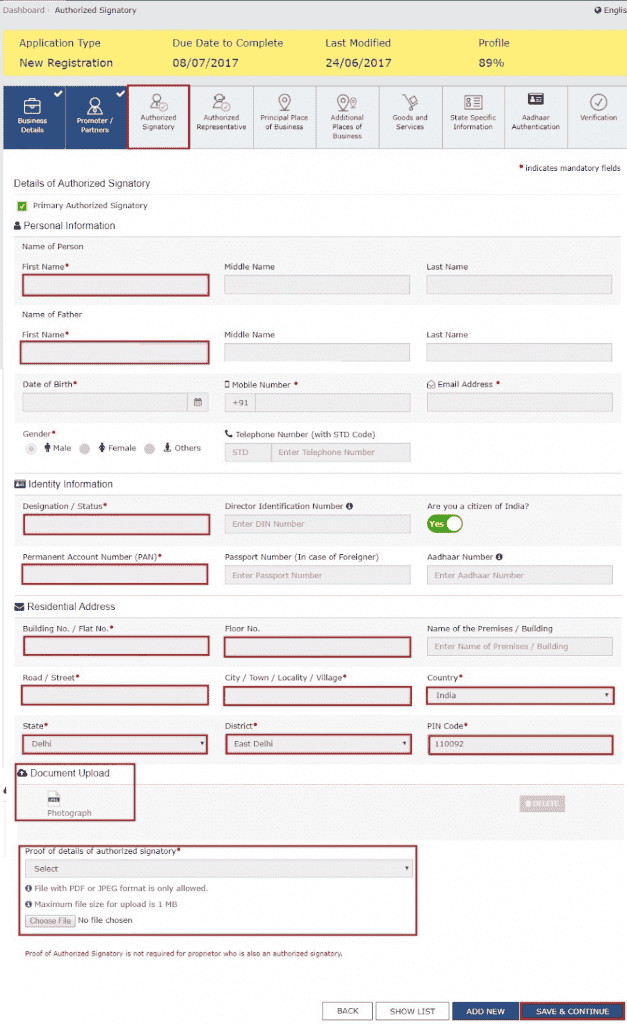
If the authorized signatory is different from the promoter, enter their details in this tab. Provide their name, PAN, Aadhaar, designation, mobile number, and email address. If the signatory is a GST Practitioner, enter their enrollment ID. You can also add an authorized representative if applicable.
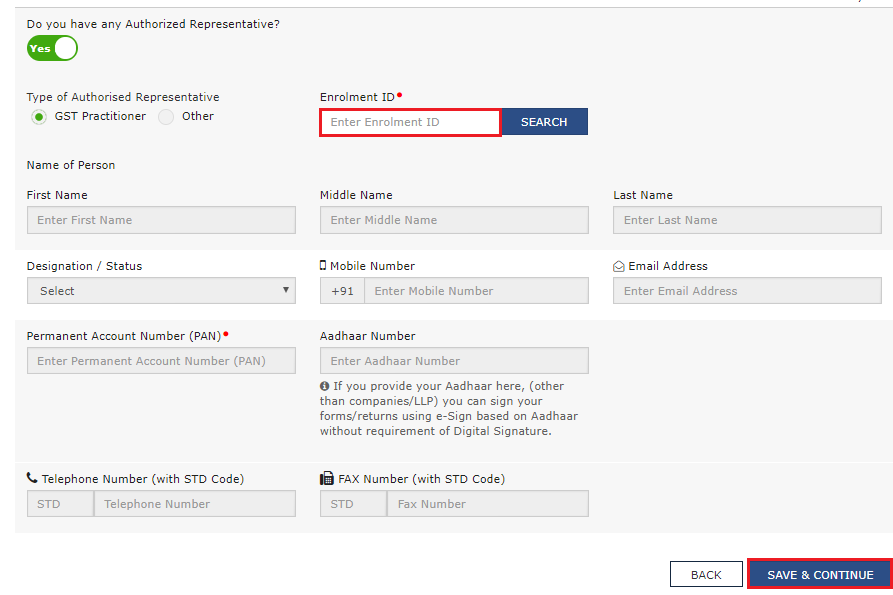
Step 11: Enter Principal Place of Business
Provide the complete address of your main business location, including pin code, district, and state. Upload the relevant address proof, such as an electricity bill, property tax receipt, or rent agreement. If the premises are rented or used with someone's permission, upload a consent letter or NOC. Also specify the nature of business activities conducted at this location. If you have additional branches or offices, add them under Additional Places of Business.
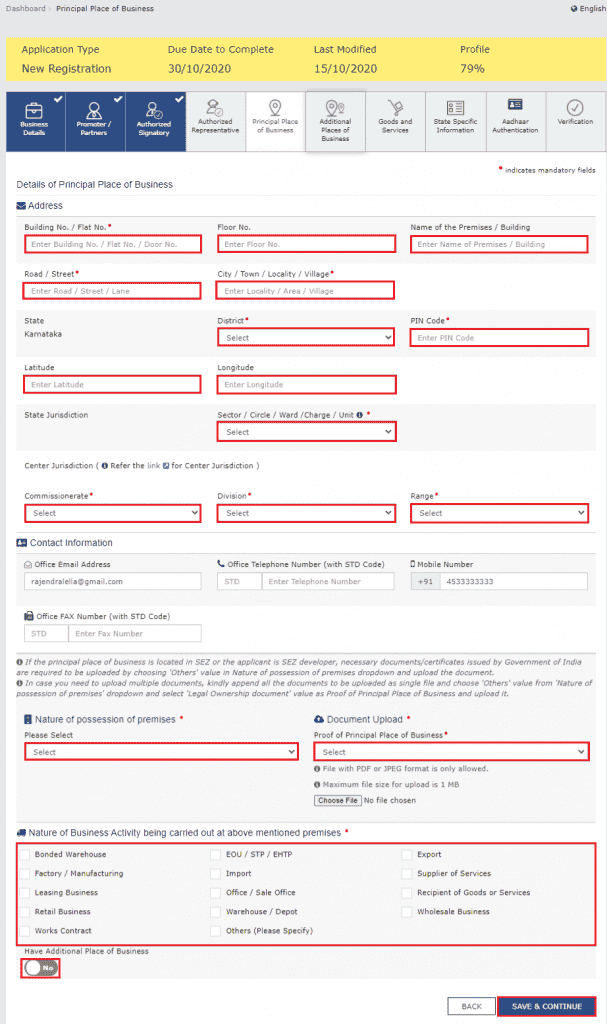
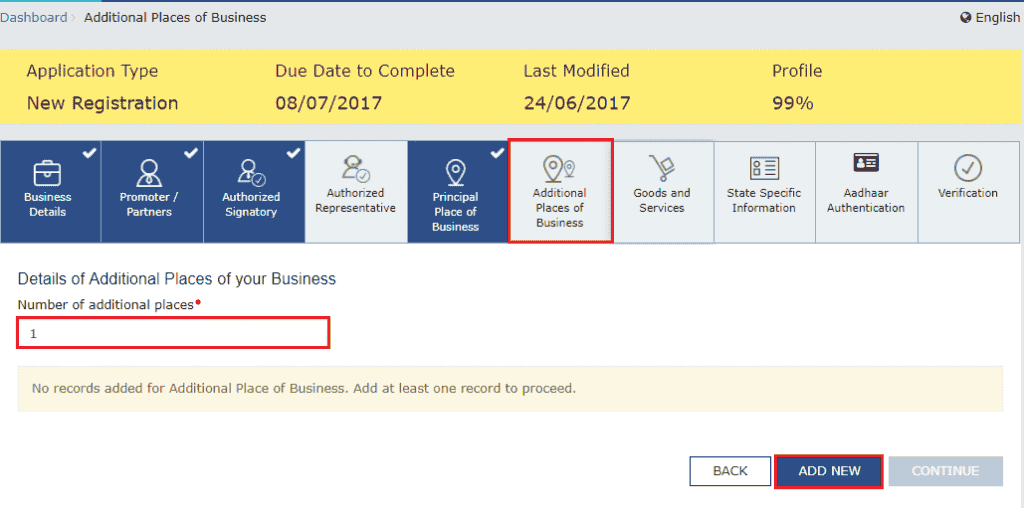
Step 12: Add Goods and Services Supplied
In this tab, enter the HSN codes for goods or SAC codes for services that your business deals in. You can add up to 5 goods and 5 services. If you are unsure of the codes, use the search function available on the portal.
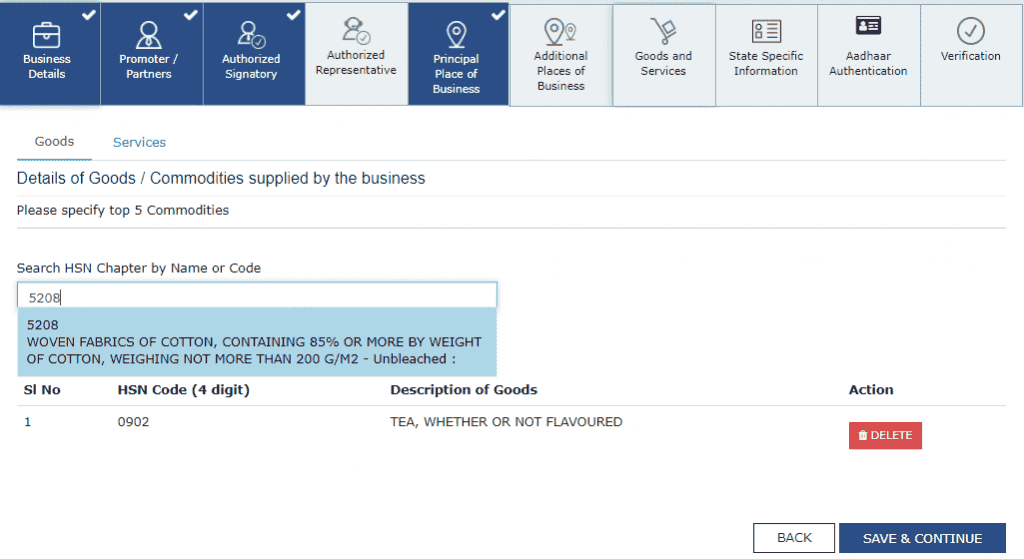
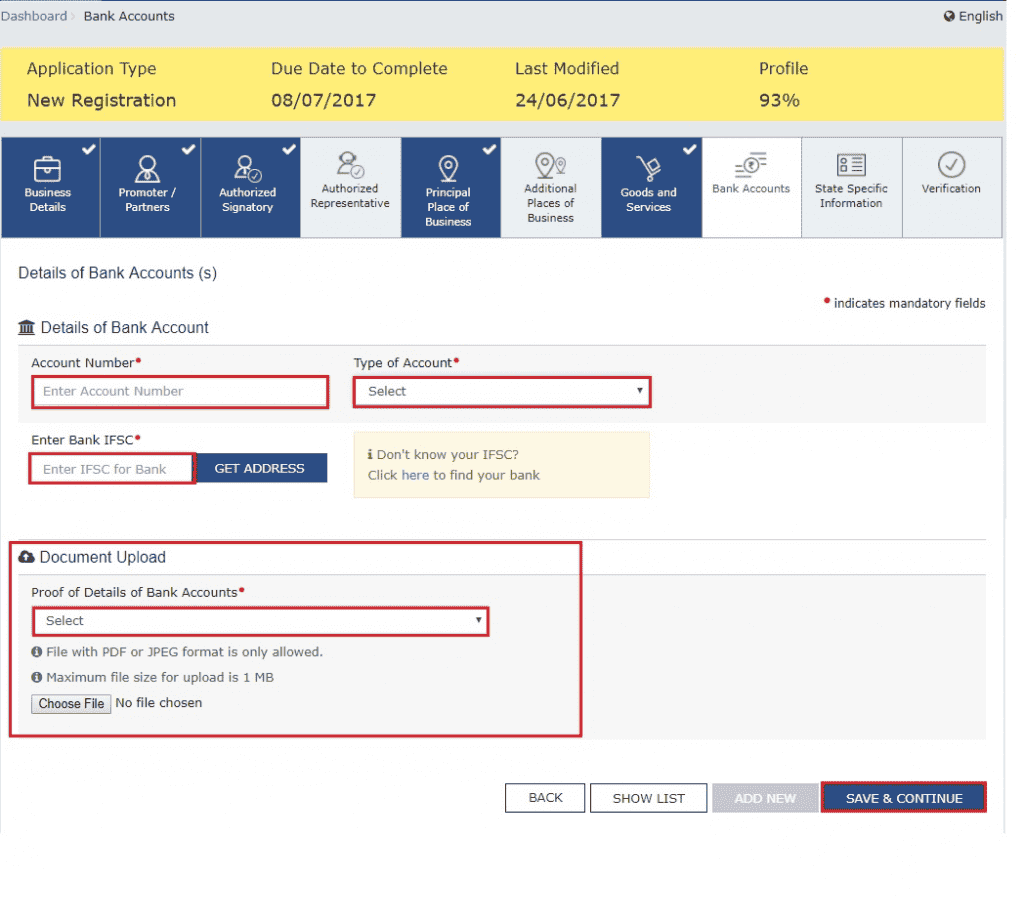
Step 13: Enter Bank Account Details
Provide details of your business bank accounts, including account number, IFSC code, and account type. You can add up to 10 accounts. Upload a supporting document, such as a cancelled cheque or bank statement. Note: Bank details were made optional for new registrations from December 2018 and can be updated after GSTIN is issued.
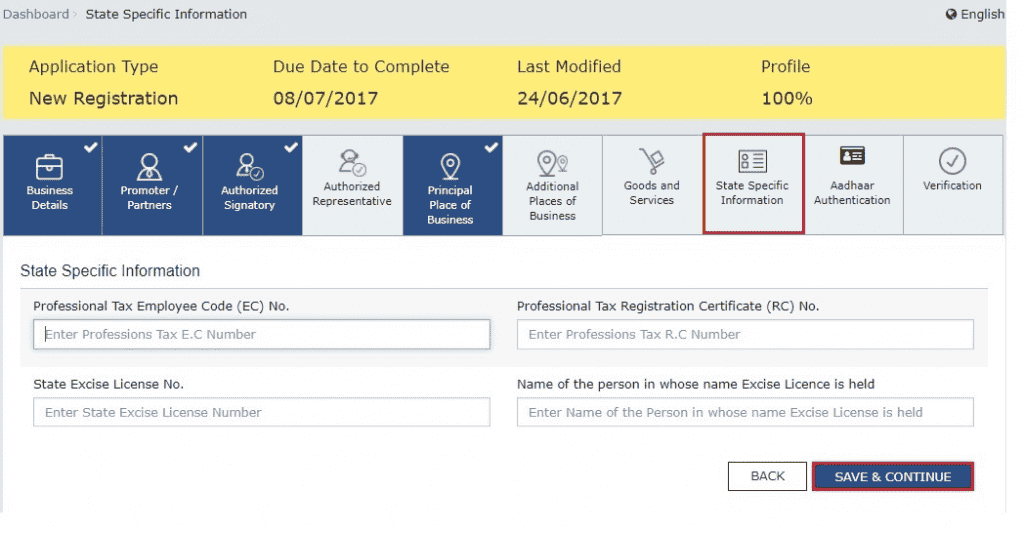
Step 14: State Specific Information
This tab collects additional details required in certain states, such as your professional tax employee code (PTEC/PTRC) or state excise license number, wherever applicable. If not applicable to your state or business, this section can be skipped.
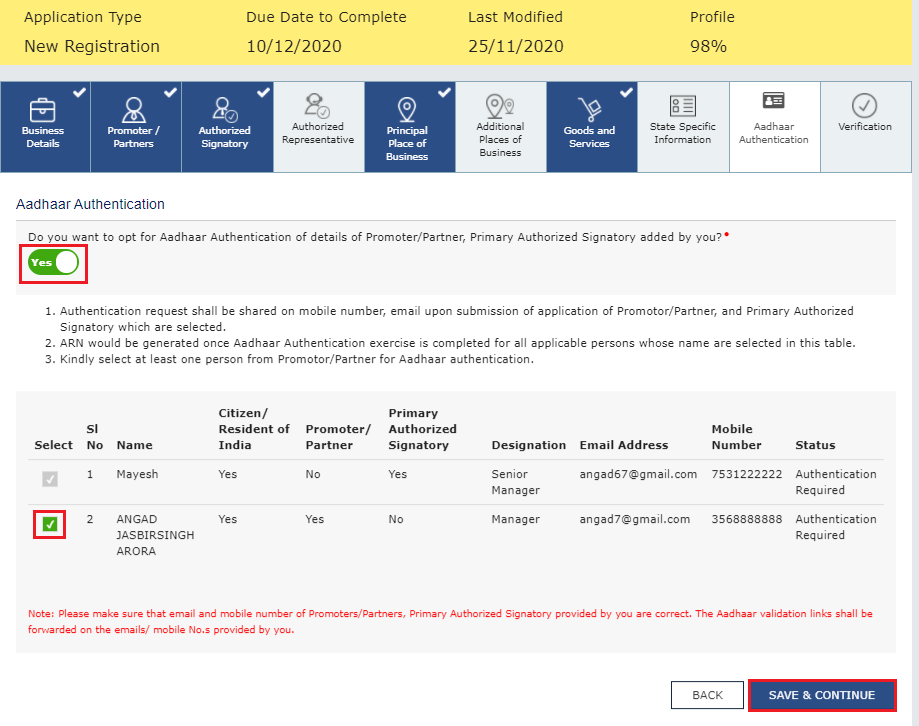
Step 15: Complete Aadhaar Authentication
You will be asked to choose whether you want to opt for Aadhaar-based authentication. If you opt in, a link will be sent to the registered mobile number or email associated with your Aadhaar. Completing Aadhaar authentication means your application will not require physical verification by a GST officer, making the process faster. Some categories (government bodies, PSUs, statutory authorities) are exempt from this step.
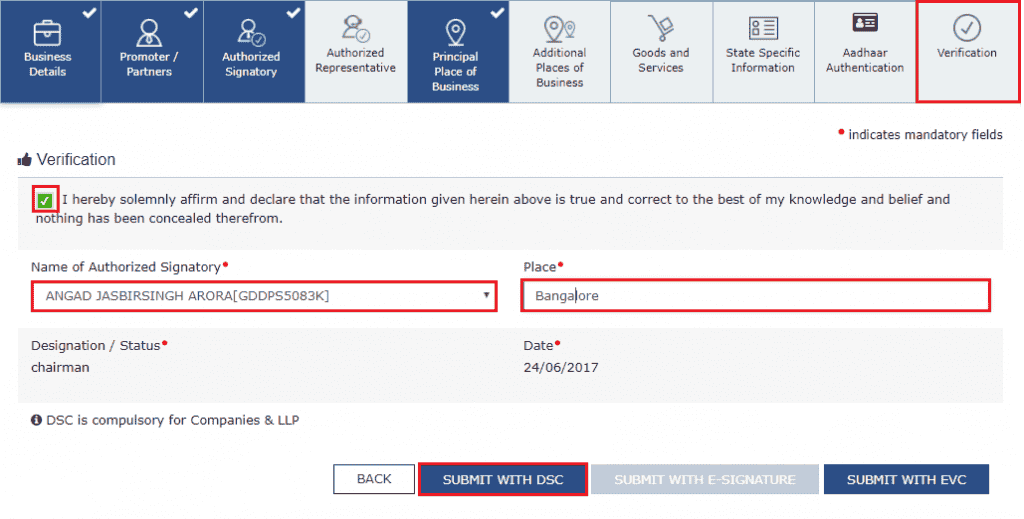
Step 16: Verify and Submit the Application
Go to the Verification tab. Review all the information entered across all tabs carefully. Check the declaration box to confirm that the details are accurate. Then submit the application using one of the following methods:
- Digital Signature Certificate (DSC): mandatory for companies and LLPs
- e-Sign: Aadhaar-based OTP authentication for individuals
- Electronic Verification Code (EVC): OTP sent to the registered mobile number
Step 17: Receive Your Application Reference Number (ARN)
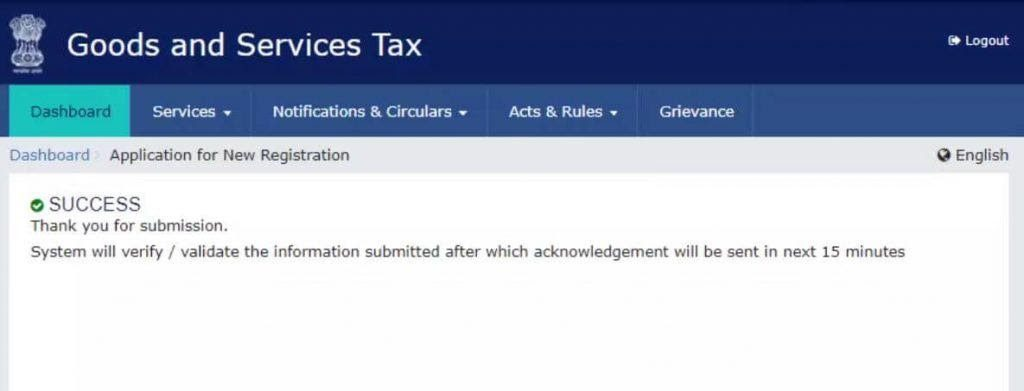
Once the application is successfully submitted, an Application Reference Number (ARN) is generated. You will receive it on your registered email and mobile number. Use this ARN to track your application status on the GST portal under Services > Registration > Track Application Status. The GST officer will review the application and either approve it or raise a query. If approved, your GSTIN is issued and you can download your GST Registration Certificate (Form GST REG-06) from the portal.
How Long Does GST Registration Take?
GST registration approval time can vary. If the application is complete and no additional checks are required, approval may be faster. If Aadhaar authentication is incomplete, documents are unclear, or the application is selected for verification, processing may take longer.
In some cases, the officer may issue a notice asking for more information. The application will proceed only after you respond properly. So it is better not to treat any timeline as guaranteed. A clean application with correct documents usually reduces delay.
What Happens After GST Registration?
Getting the GSTIN is only the first step. The real work starts with staying compliant in day-to-day business.
1. Issue GST-Compliant Invoices
Every invoice should include important details such as your business name, GSTIN, invoice number, invoice date, customer details, HSN or SAC code, taxable value, GST rate and the CGST, SGST, IGST or Cess breakup, where applicable. For B2B sales, the customer’s GSTIN should also be added.
2. Maintain Sales and Purchase Records
Keep proper records of sales invoices, purchase bills, debit notes, credit notes, tax collected, input tax credit and stock details, where applicable. These records help during GST return filing, reconciliation, notice replies and business review.
A simple billing and record-management tool can help at this stage. Small business owners can use mazu to create invoices and keep billing records organised, so GST-related details are easier to track when returns or reports are prepared.
3. File GST Returns
Regular GST taxpayers generally file GSTR-1 for outward supplies and GSTR-3B for summary return and tax payment. GSTR-9 annual return may also apply in certain cases. Some eligible businesses can opt for the QRMP scheme. Under QRMP, returns are filed quarterly, but tax is paid monthly.
4. Add Bank Account Details on Time
If bank account details were not added during registration, they must be added on the GST portal within the required time after registration. Otherwise, it can create compliance issues and may affect the status of registration.
5. Pay GST on Time
GST collected from customers must be paid to the government on time. You may be able to reduce your tax payable by using eligible input tax credit. Late payment can attract interest and late fees.
Common Mistakes to Avoid During GST Registration
1. Applying Without Checking Eligibility
Do not apply only because someone says every business needs GST registration. First check your turnover, type of supply, state, selling channel and whether any compulsory registration rule applies.
2. Calculating Turnover Separately for Each Branch
GST turnover is calculated on a PAN-India basis. If the same PAN is used for more than one shop, branch or state, the turnover of all locations is counted together.
3. Looking Only at the Turnover Limit
Some businesses must register even below the turnover limit. This can happen in cases such as inter-state taxable supply, casual taxable activity, e-commerce supply, reverse charge liability or other compulsory registration categories.
4. Uploading Unclear or Mismatched Documents
Your PAN, legal business name, address proof and uploaded documents should match the application details. Blurry documents, wrong address proof or missing NOC for rented premises can delay approval.
5. Using Contact Details That Are Not Accessible
Use a mobile number and email ID that the business owner or authorised signatory can access regularly. These are used for OTPs, notices, application updates and future GST portal communication.
Conclusion
GST registration is not the same for every small business. The right decision depends on your turnover, state, type of supply, selling channel and whether any compulsory registration rule applies.
If registration is required, apply within the prescribed timeline and keep your documents ready before starting the process. If it is not compulsory, choose voluntary registration only when it gives your business a clear benefit, such as input tax credit or easier B2B sales.
Once registered, focus on correct invoicing, organized records, timely return filing, and regular tax payment. These habits make GST compliance easier as your business grows.